Briefcaster
The world’s news bulletins, played back to back.
JEM Studios by Harborview Holdings
Press play once and the newest bulletin from every newsroom you have switched on plays in turn — NPR, then Deutsche Welle, then Cadena SER — and when it reaches the end it begins again with whatever has been published since. No feed to scroll. No algorithm. No episode list to pick through.
iPhone · iPad · Mac
A radio station made out of everyone else’s newsrooms
Most news apps give you one country’s version of the day, arranged by an algorithm, in a feed you have to work through. Briefcaster does something older and simpler: it finds the newest short news bulletin from each station you have chosen and plays them one after another, like a radio station that only broadcasts the headlines.
The mechanic
Every source in the catalogue is a news bulletin a broadcaster already publishes as a free podcast feed — typically two to five minutes, refreshed hourly or several times a day. Briefcaster reads the feed, takes the most recent episode, and queues it.
The running order is not a folder order or a ranking. It is simply the order you switched your sources on. Switch one off and it leaves the queue; switch it back on and it joins the end.
Why the language spread matters
The same morning sounds different in Tokyo, Bogotá and Berlin — not because anyone is lying, but because the story that leads is the one that matters where it is being read. Hearing six newsrooms in a row is the cheapest way to notice that.
And a listener who speaks only English is not left out: 89 of the bulletins are in English, from 20 different countries, so the same world tour is available without a second language.
Where the sources come from
Public broadcasters, wire services, national radio networks and a handful of city stations — every one an openly published RSS feed the broadcaster offers free. Nothing is scraped, no unofficial API is used, no feed needs a key. Each was fetched and checked by hand, and the whole catalogue was last swept in September 2026 with no dead feeds found.
What it does
- Plays continuously. One tap starts a rotation that runs until you stop it, in the background, on the lock screen and over CarPlay.
- Local first. On first launch it can put your own country’s language at the top of the queue. Optional, asked once, declinable with nothing lost.
- Skips what you have heard. A bulletin already played is not repeated.
- Longer programmes, separately. 184 of the sources are full programmes rather than bulletins; they play after a language’s short bulletins, or not at all.
- Speed and sleep. Variable playback rate and a sleep timer.
- Your own feeds. Any podcast RSS URL can be added by hand, with the same language, region, topic and title-filter controls the built-in catalogue uses.
- Search. All 520 sources searchable by name, organisation, language or country.
There is no social layer, no comment thread, no push notification, no recommendation engine and no article text. Briefcaster is a player for other people’s broadcasts and nothing more, which is what lets it be a single screen you can start and then put in a pocket.
Three screens, and that is the whole of it
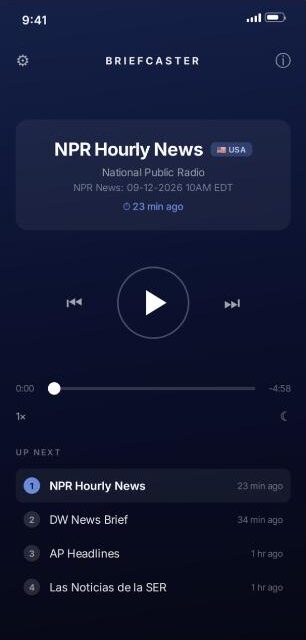
The player
What is on now, how fresh it is, and what is queued behind it. The circled number on each row is that source’s place in the rotation.
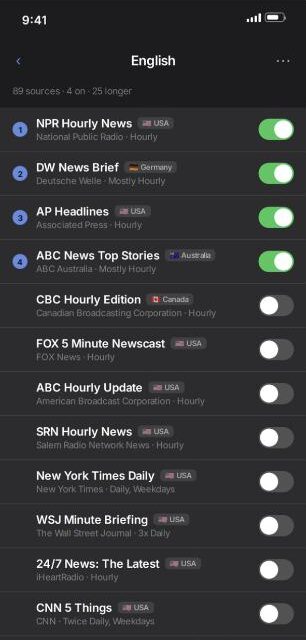
Sources
Browsed by language, with the country flag and how often each bulletin is published. Switching one on puts it at the end of the queue.
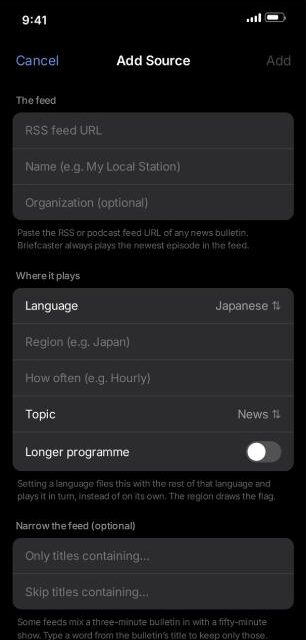
Add your own
Any podcast RSS feed, filed into a language and topic so it plays in turn — with title filters for feeds that mix a short bulletin in with a long show.
There is no drag-to-reorder and no manual playlist, on purpose. Ordering by activation means one gesture — a toggle — both chooses a source and places it, and every screen in the app can show you the same running order without a second concept to learn.
Away from the screen
CarPlay, the lock screen, Control Centre and AirPlay all carry the transport controls and the name of whatever is on. Audio keeps running with the app in the background.
On the Mac
The same app, built for macOS through Mac Catalyst rather than ported. Held to a single column on purpose — there is no second pane to reveal, so a wider window would only spread the same content thinner.
Freshness, shown
Every bulletin carries how long ago it was published. A rotation is only worth anything if you can see at a glance that it is current.
520 bulletins, 115 languages, 96 countries
The eleven largest languages
| English | 89 |
| Spanish | 54 |
| Arabic | 27 |
| Chinese | 23 |
| Portuguese | 19 |
| French | 16 |
| Italian | 13 |
| German | 12 |
| Dutch | 12 |
| Russian | 11 |
| Korean | 10 |
The other 104 languages carry between one and nine sources each. Forty-eight of them have exactly one — Dinka, Tigrinya, Tetum, Võro, Rusyn, Cook Islands Māori — which is the part of the catalogue that took the longest to build and is hardest to find anywhere else.
What kind of programme
| News bulletins | 443 |
| Money & Markets | 57 |
| Slow & Simple (language learners) | 10 |
| Sports | 6 |
| Weather | 4 |
English, by country
89 English-language bulletins published from 20 countries. A listener who speaks no second language still hears the day from four continents.
How the catalogue is built
| Sources | 520 podcast RSS feeds |
| Languages | 115 |
| Countries | 96 with a national flag, plus global services |
| Long-form | 184 full programmes, kept out of the bulletin rhythm |
| Filtered | 90 feeds carry a title rule, so one feed can supply two distinct programmes — or exclude a long show mixed in with the bulletins |
| Licensing | Openly published feeds only. No scraping, no unofficial APIs, no keys |
| Verification | Every feed fetched by hand; items, enclosure, publication date and duration checked |
The catalogue grows mostly from listeners pointing at things that were never found. A feed address and a language are enough to go on.
Pricing, privacy and the facts
Pricing
Any ten from the full catalogue, including the rare languages. No account, no trial clock.
Everything unlocked. Cancel anytime through the App Store.
The same, at a 37% saving against monthly.
A one-time purchase. No renewal, no expiry.
Handled entirely by Apple’s App Store. iPhone, iPad and Mac share one identifier, so a single purchase covers all three.
Privacy
Briefcaster has no accounts, no analytics, no advertising and no server of its own, and contains no third-party code of any kind — zero external dependencies. Which sources are on, the order they are in and which bulletins have been heard are stored on the device and go nowhere else.
Audio is fetched straight from each broadcaster, so those broadcasters see the request the way any website would; nothing is routed through a server in between, because there is no server in between. The optional location lookup resolves to a two-letter country code and is discarded.
At a glance
| Name | Briefcaster |
| Category | News · Audio |
| Platforms | iPhone, iPad, Mac |
| Minimum OS | iOS / iPadOS 16.4, macOS via Mac Catalyst |
| Also supports | CarPlay, lock screen and Control Centre, background audio, AirPlay |
| Interface | English |
| Developer | JEM Studios by Harborview Holdings |
| Accounts | None — no sign-up, no email, no password |
| Analytics / Ads | None |
| Third-party SDKs | Zero |
| Data stored | On the device only; deleted with the app |
| Cookies | Refused on every request |
james@harborviewholdings.group
JEM Studios by Harborview Holdings
The app icon and the screens above may be reproduced for editorial coverage of Briefcaster. Broadcaster names are the trademarks of their respective owners and appear here only as a description of the catalogue; no partnership or endorsement is implied.